For Providers

Ordering StudiesRequest Images or Reports | Upload Radiology Images | Ambassador Services

North Star Radiology is committed to supporting our patients, referring providers, and community partners. For administrative questions, general assistance, or help finding the appropriate resource, please contact our office.

providers

Ordering Studies

If you have any questions or need assistance with submitting an order, please call our office at 907-459-6555. You can also fill out the appropriate form below and fax it to 907-459-6566.

Download Our Fillable PDF Order Forms:

Request Images or Reports

Our easy-to-navigate picture archiving and communication system (PACS) portal is available to all referring providers. PACS is your central tool for:

  • Image viewing
  • Patient communication
  • Collaboration

Visit https://nsr.mypacsimages.com/ to register for a free account or to login. If you have further questions, call (907) 459-6555 and dial 1260 to be connected to our PACS Administrator.

Exam reports and images on DVD can also be obtained by calling our office at 907-459-6555.

The North Star Radiology picture archiving and communication system (PACS) gives referring providers a timely, easy-to-navigate, and secure portal for accessing images and exam reports.

Applying For An Account

  • Open a web browser and navigate to https://nsr.mypacsimages.com/.
  • Click on “Apply for Account.”
  • Follow the directions on screen, including signing a HIPAA compliance agreement.
  • We will verify your account, and access will be granted within a few business days.
  • Questions? Call our PACS System Analyst at (360) 428-7231.

Logging In

  • Open your web browser and enter the web address https://nsr.mypacsimages.com/ to access our PACS medical system.
  • Enter username and password.
  • Click on the arrow or press enter to access the site.

Searching For Patients and Imaging Exams

  • In the search box, you must type at least the first two characters of the patient’s family name, ID or the accession number. Press enter.
  • To filter the search results by adding the date of birth, select the down arrow within the search box and enter the date in the following format: DD/MM/YYYY. Press enter. Note:
  • If the list of search results is longer than one page, click on a column title to sort the results.
  • Select a patient from the search results. The patient record will appear, allowing you to view all orders associated with the patient and any candidate patient orders.
  • Click on an order or a candidate patient order to view detailed information.

Upload Radiology Images

PowerShare Medical Image Upload

What is PowerShare?

North Star Radiology has partnered with Nuance PowerShare to offer providers and patients a way to securely load medical images directly into North Star Radiology’s systems. Allowing providers and patients access to upload medical images directly helps improve patient care and reduce dependencies on CDs and DVDs.

What are the system requirements?

For the best experience, it is recommended that you use one of these browsers: Chrome, Firefox or Microsoft Edge.

  1. Click the Upload Radiology Images button, above, to start the process. You will be taken to the secure PowerShare uploader in a new browser window.
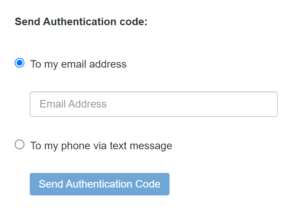
  2. To receive an authentication code, enter either your email address or mobile number.
  3. After you confirm your authentication code, you will be taken to the upload page.
  4. Insert CD or DVD, if applicable, into optical disc drive.
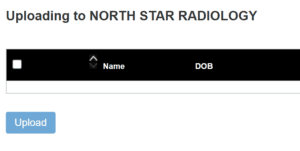
  5. Whether the images are located on the computer, an external drive or a CD/DVD, click Choose Folder. Navigate to where the images are located and click Upload until the list displays with the study detail.
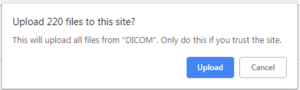
  6. If there is more than one image to upload, a dialog box will display confirming images to upload. Click Upload.
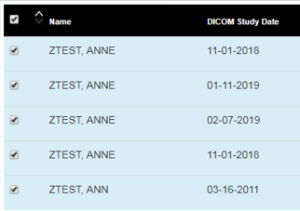
  7. To select all studies, check the box next to the Name column. Individual studies can be selected by checking the box next to the study.
  8. Click Upload in the bottom left to upload the images.
  9. Once study uploads have been completed, denoted by Transfer Complete in the Progress bar, you may exit your browser window.

What if I need help?

Please verify the browser requirements listed above. For questions or assistance, please call (907) 459-6555 ext.9.


Ambassador Services

Ambassador Service is a dedicated support team for referring providers and medical staff. We strive to provide the highest level of care and service by connecting our referring community with our subspecialty radiologists. Our radiologists are always available to answer questions or provide guidance on specific studies.

To reach our Ambassador Service, call 907-459-6555 and select option 9, or use the dedicated Ambassador Service email address assigned to your group.